Allocation Spread
Last updated: October 21, 2026
How it works and how to tune it Customer guide | Fleet configuration | October 2026
Allocation spread controls how many machines your new game sessions are shared across at once. Instead of filling one machine completely before moving to the next, Multiplay can place new allocations across up to N machines, so start-up load never piles onto a single host.
01 Overview
The value is a whole number, 1 or higher, and is set once per fleet. It applies to every region in that fleet.
This guide explains what the setting does, the trade-offs between a low and a high value, and how to choose the
right starting point for your title.
02 Why it matters
Game servers use the most CPU and memory while they are starting up: loading maps, assets and configuration. If
many sessions are allocated to the same machine within a few seconds, those start-ups compete for the same
resources.
That contention can show up for players as slow joins, hitches early in a match, or degraded tick rate on the servers that share the busy host. Spreading allocations across several machines smooths out that start-up burst, which is most noticeable during launches, events and other sharp rises in player numbers.
03 How it works
The value you set is the maximum number of machines that new allocations are spread across.
• Spread of 1: Allocation Spread is off. Every new session goes to a single "hot" machine until it is full, then the next machine takes over. This packs servers tightly and lets idle machines scale down sooner.
• Spread greater than 1 (N): new allocations are placed across a random number of machines between 1 and N. With a value of 3, sessions land on up to three machines at a time, each carrying part of the start-up load.
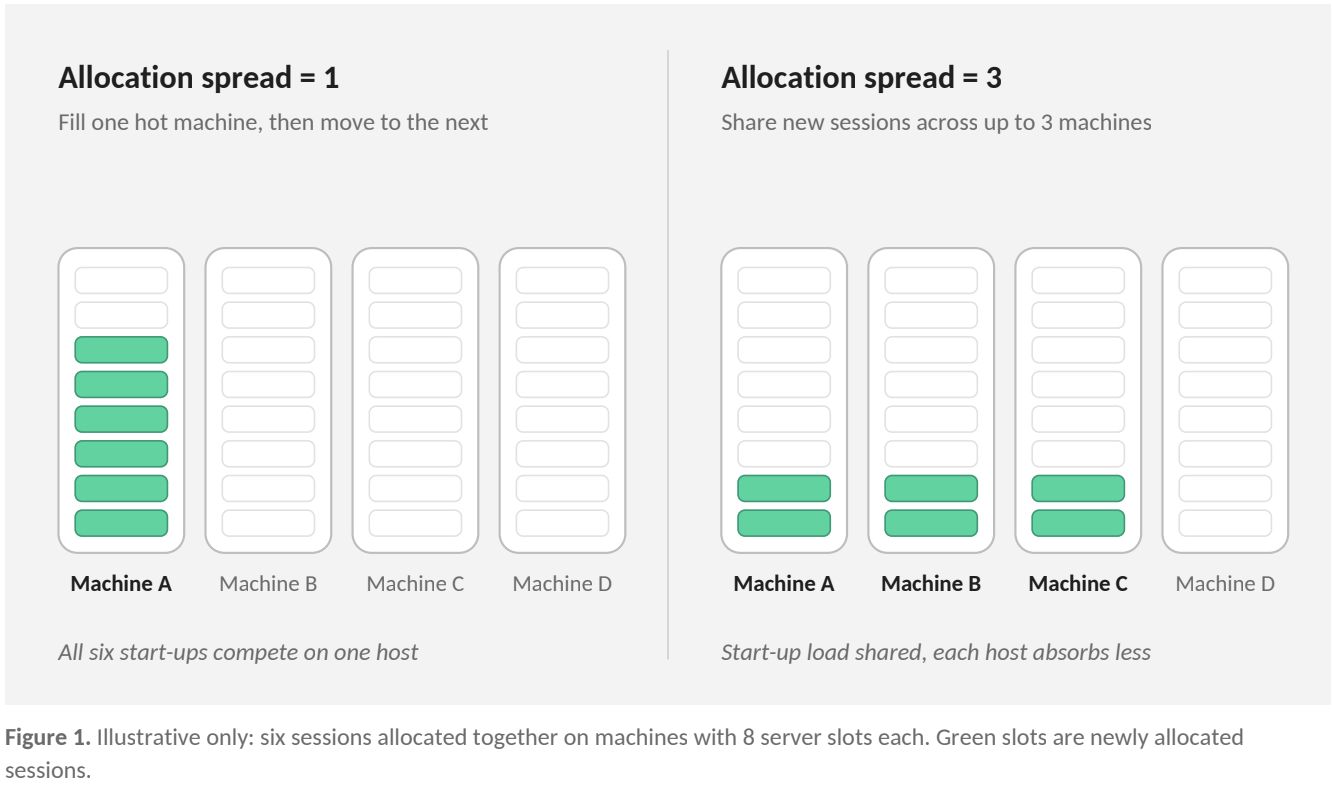
Because the number of machines used is chosen at random between 1 and N, the split in practice will vary from the even pattern shown above. Spread works with the machines that are already online and available; it does not add capacity on its own.
04 Trade-offs
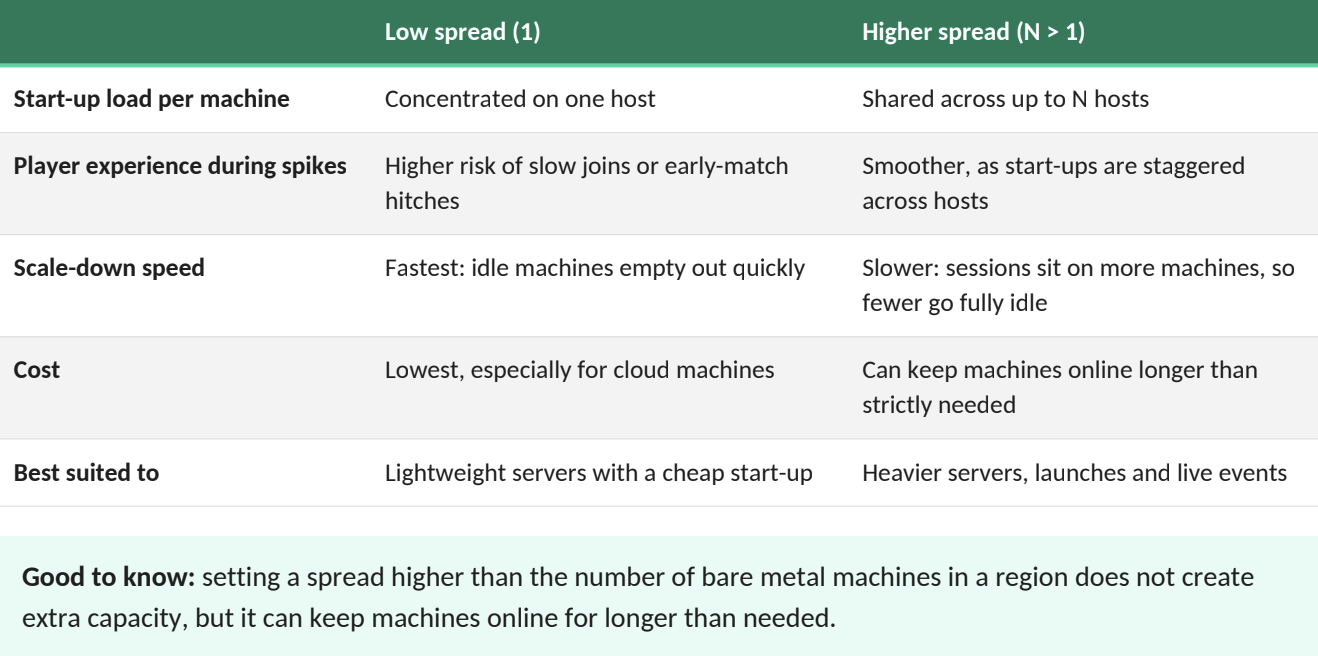
A higher spread protects player experience during busy periods; a lower spread keeps your fleet lean during quiet ones.
05 Choosing a value
There is no single correct value: the right setting depends on how heavy your server start-up is and how quickly players arrive. Your Multiplay account team will recommend a starting point with you, based on playtest data.
1 Start from your server's start-up profile. If a server's CPU or memory peaks sharply while it boots, a spread
above 1 is worth using. If start-up is light, a spread of 1 keeps costs down.
2 Consider your arrival rate. Launches, play tests, events and daily peaks bring many allocations in a short
window, where spreading has the most benefit.
3 Keep it below your machine count. Size the value against the number of machines typically online in your
smaller regions, not your largest one.
4 Watch the results and adjust. After a change, review per-machine CPU during busy periods and how quickly
your fleet scales down afterwards. Tune in small steps.
As a rule of thumb, values in the low single digits are a common starting point for a title's first live tests, refined once real traffic data is available.
06 Where it is configured
Allocation spread is set at the fleet level only. Most other scaling settings can be overridden per region, but this one applies to every region in the fleet. If one region needs different behaviour, speak to your account team about the options.
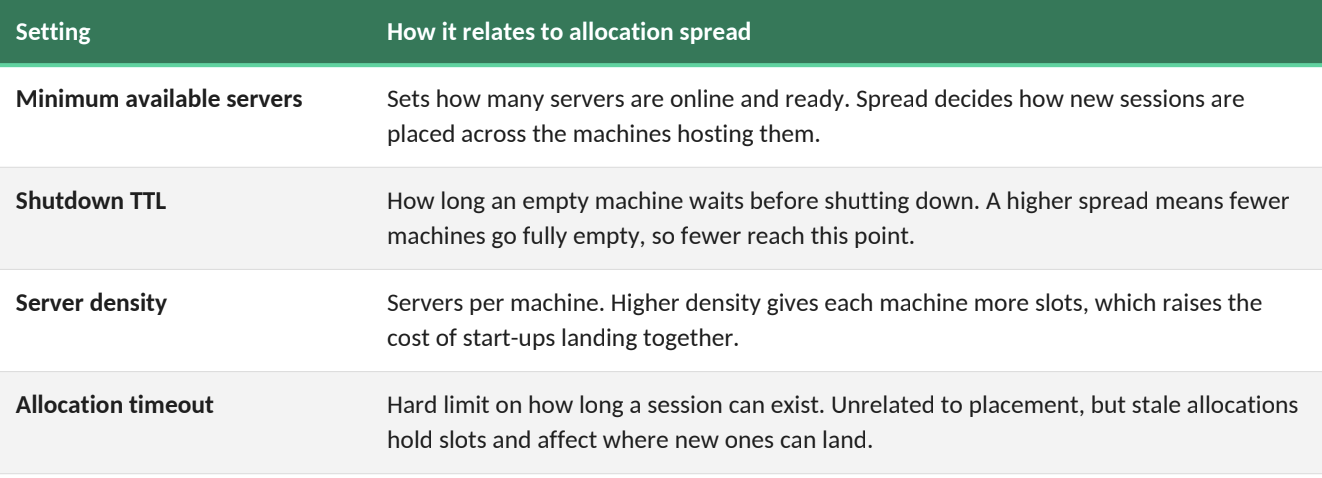
It works alongside your other scaling settings:
07 Frequently asked questions
Does a higher spread give me more servers?
No. It changes where new sessions are placed, not how many servers exist. Capacity is governed by your minimum available servers, maximum servers and machine count.
Will changing it affect players already in a match?
No. The setting only affects new allocations. Sessions already running stay where they are.
Why are some machines staying online longer after I raised the spread?
Sessions are now spread across more machines, so fewer machines become completely empty and eligible to shut down. If this costs more than the benefit, step the value down.
Can I set a different value per region?
Not directly. Allocation spread is a fleet-wide setting. Your account team can advise if a region needs different
handling.
I'm seeing a single machine fill up during a busy period. Is that expected?
With a spread of 1, yes: that is the intended behaviour. If start-up load on that machine is affecting players, raising the spread is the usual fix.
Who should I talk to about changing it?
Your Technical Account Manager. We will review your server's start-up profile and recent fleet metrics with you before recommending a value.