Fleets Overview
Last updated: June 5, 2026
A fleet is a collection of servers that host a game or application in specific regions. After your fleet is online, you can start making allocations via your matchmaker. You can have one or more fleets, and each fleet has a view where you can view the fleet details, the linked build configurations, the scaling settings, and the fleet analytics.
Each fleet has the following associated information:
Fleet name: The human-readable name of the fleet.
Fleet ID: The unique identifier of the fleet.
Operating system: The operating system that the machines within the fleet run. You select a fleet's operating system when you create a fleet. You can't change the fleet operating system later.
Build configurations: The build configurations linked to the fleet.
Regions: One or more regions and their associated scaling settings.
Fleet example
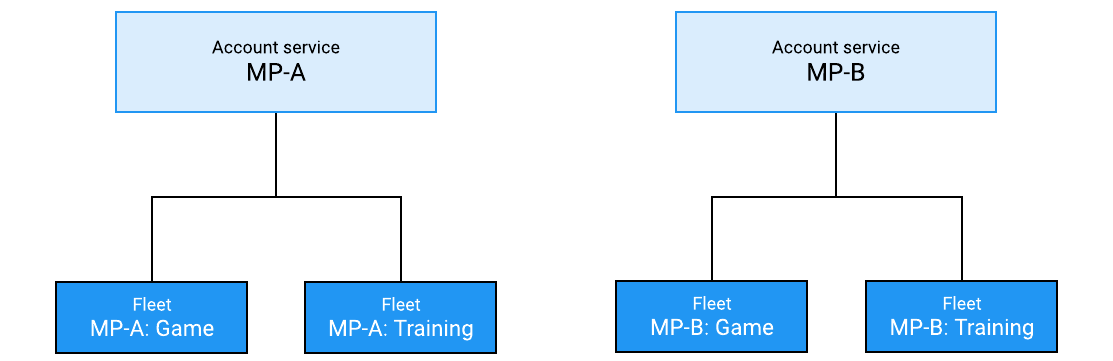
A studio is releasing a new multiplayer game, MP-B, which is hosted on Multiplay. This studio had previously released a game on Multiplay, called MP-A. Both games have two components that need hosting:
The game server, which is where players actually play the game session.
A training server, which is where players learn how the game works before joining a real session.
Each of these games must be billed separately, so Multiplay creates an account service for MP-A and another for MP-B. For both games, the training servers use fewer resources than the game servers, and don't require as much scaling. Accordingly, Multiplay separates these two servers into different fleets: one fleet for training servers, and the other for game servers. The following diagram shows an example of this configuration.
Additional resources
Fleet lifecycle
Fleet analytics
Fleet API workflow
Machine provisioning